https://youtu.be/2e72RHO8ORk?list=PL6gx4Cwl9DGDPsneZWaOFg0H2wsundyGr
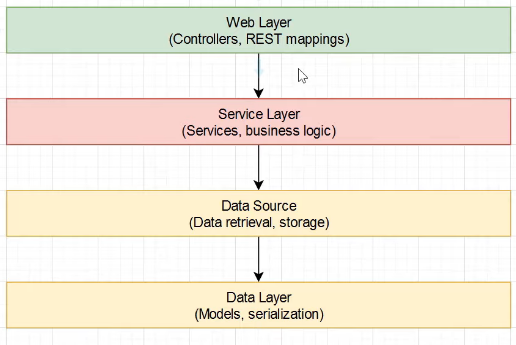
가장 상위 레벨인 Web Layer를 배워보도록 하겠습니다.
Web Layer에서는 rest mapping을 정의하고 request를 핸들링하며 response를 준비합니다.
이를 위한 적절한 endpoint와 컨트롤러를 준비해줘야 합니다.
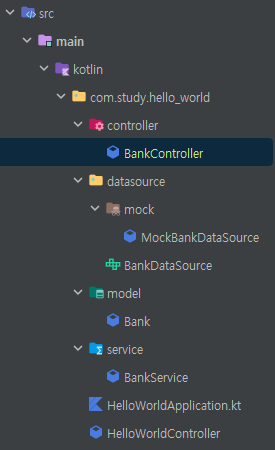
이를 위해 controller 패키지와 BankController class를 만들어 줍니다.
컨트롤러 임을 알리기 위해 BankController Class에 @RestController 어노테이션을 달아줍니다.
@RestController는 단순히 객체만을 반환하며 객체 데이터는 json 또는 xml로 전송하게 됩니다. @Controller와 @ResponseBody를 합친 동작을 수행합니다.
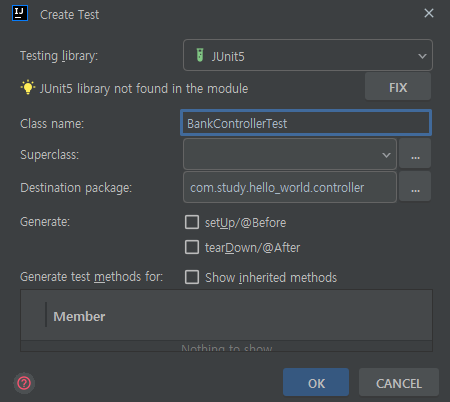
BankControllerTest를 제작해줍니다. 이곳에서 수행할 테스트는 해왔던 것들과는 조금 다릅니다.
단순히 POJO를 생성하여 기능테스트를 해왔던 것과는 다르게 Spring Boots testing capabilities를 사용해 볼겁니다.
이를 위해 @SpringBootTest 어노테이션을 클래스에 달아줍니다.해당 어노테이션을 일일이 Initilize 해줄 필요가 없어집니다.
package com.study.hello_world.controller

import org.junit.jupiter.api.Test
import org.springframework.beans.factory.annotation.Autowired
import org.springframework.boot.test.autoconfigure.web.servlet.AutoConfigureMockMvc
import org.springframework.boot.test.context.SpringBootTest
import org.springframework.test.web.servlet.MockMvc

@SpringBootTest
//@AutoConfigureMockMvc
internal class BankControllerTest {

	@Autowired
	lateinit var mockMvc: MockMvc

	@Test
	fun `should return all banks`() {
		// given


		// when


		// then


	}

}
mockMvc를 만들어 줍니다. 이 친구는 테스트에 사용되며 실제 http requests 없이 테스팅을 가능하게 해줍니다.
이 친구 위에 @Autowired 어노테이션을 달아줍니다. 이 어노테이션은 일일이 dependency를 정의 해줄 필요없이 모든 bean들을 자동으로 설정해줍니다.
이를 위해 클래스 위에 @AutoConfigureMockMvc 어노테이션을 추가해줍니다.
만약 해당 어노테이션을 빼고 테스트를 하게 된다면?

이러한 에러가 발생하게 됩니다.
전체 application context를 초기화 하지 못했으며, 초기화가 빠져있거나 빈들사이에 충돌이 발생했거나 어떤 타입인지를 알 수 없다는 에러입니다.
Caused by: org.springframework.beans.factory.NoSuchBeanDefinitionException: No qualifying bean of type 'org.springframework.test.web.servlet.MockMvc' available: expected at least 1 bean which qualifies as autowire candidate. Dependency annotations: {@org.springframework.beans.factory.annotation.Autowired(required=true)}하단에 원인이 적혀있습니다.
MockMvc의 빈타입이 정의되어있지 않다고 합니다. 해당 에러는 자주 발생하며 알아두면 도움이 될겁니다.
우리는 아직 테스트를 위한 BankController를 제작하지 않았습니다.
@SpringBootTest를 위해서는 실제로 해당 타입의 오브젝트는 필요하지 않습니다. 알아서 전체적인 initiallize를 실행 해주니까요. 이 대신 실제 테스트를 위한 endpoint만 있으면 됩니다.
@Test
	fun `should return all banks`() {
		// given
		mockMvc.get()
		mockMvc.post()
		mockMvc.delete()

		// when


		// then


	}
mockMvc를 통해 get post delete등 모든 http method를 테스트 할 수 있습니다.
@Test
	fun `should return all banks`() {
		// given
		mockMvc.get("/api/banks")
			.andDo { print() }
			.andExpect { status { isOk() } }
		// when


		// then


	}
get을 테스트 하기위해 해당 코드처럼 작성했습니다.
andExpect를 보면 많은 수의 괄호가 있습니다. 다른 언어와 코틀린과의 차이점입니다. 일반적으론 1줄로 쓰는게 일반적이며,
mockMvc.get("/api/banks")
			.andDo { print() }
			.andExpect {
				status { isOk() }
				content {  }
			}
status뿐만이 아닌 내용 검증이나 다른 걸 검증할때는 함수와 비슷하게 한줄을 띄고 작성합니다.
사실 given이 아닌 when과 then이 합쳐진 구조입니다.
	@Test
	fun `should return all banks`() {
		// when/then
		mockMvc.get("/api/banks")
			.andDo { print() }


			//then
			.andExpect { status { isOk() } }
	}
andExpect에서 검증을 하게 됩니다. 실행하게 되면?
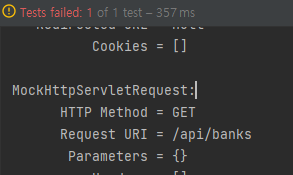
에러가 나게됩니다. 에러 메시지를 한번 보겠습니다.
GET 요청울 /API/BANKS로 받았다고 합니다.
Status expected:<200> but was:<404>
Expected :200
Actual   :404
<Click to see difference>
현재 /api/banks 에 대한 endpoint가 없기 때문에 200(성공)이 아닌 404(에러) status가 반환되어서 그렇습니다.
BankController를 HelloWorldController를 참고하여 수정해보겠습니다.
package com.study.hello_world.controller

import com.study.hello_world.model.Bank
import com.study.hello_world.service.BankService
import org.springframework.web.bind.annotation.GetMapping
import org.springframework.web.bind.annotation.RequestMapping
import org.springframework.web.bind.annotation.RestController

@RestController
@RequestMapping("/api/banks")
class BankController(private val service: BankService) {

	@GetMapping
	fun helloWorld(): Collection<Bank> = service.getBanks()
}
가 완성 코드가 됩니다. 일단은 테스트를 위해 건너 뛰고 성공코드만 받게 변경하겠습니다.
class BankController(private val service: BankService) {

	@GetMapping
	fun helloWorld(): String = "works"
}
와 같이 변경해줍니다.
테스트 코드 또한 변경해줍니다.
@Test
	fun `should return all banks`() {
		// when/then
		mockMvc.get("/api/banks")
			.andDo { print() }


			//then
			.andExpect {
				status { isOk() }
				content { contentType(MediaType.APPLICATION_JSON) }
				jsonPath("$[0].accountNumber") { value("abcdef") }
			}

	}
contentType이 json 타입인지 검사하고, 들어온 데이터의 첫번째 accountNumber가 abcdef인지 확인하게됩니다.
이를 실행하면

우리가 String을 return하게 해놨기에 에러가 나오게됩니다. 다시 BankService를 처음의 코드로 변경해줍시다.
@RestController
@RequestMapping("/api/banks")
class BankController(private val service: BankService) {

	@GetMapping
	fun helloWorld(): Collection<Bank> = service.getBanks()
}
실행해보면
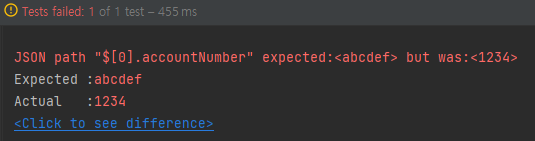
abcdef가 아닌 1234가 들어왔다는 에러가 나오게 됩니다.
@Test
	fun `should return all banks`() {
		// when/then
		mockMvc.get("/api/banks")
			.andDo { print() }


			//then
			.andExpect {
				status { isOk() }
				content { contentType(MediaType.APPLICATION_JSON) }
				jsonPath("$[0].accountNumber") { value("1234") }
			}

	}
value를 수정해주면

성공하게 됩니다.

성공 메시지를 보면 Status 는 200이며 에러메시지가 없고 Content-Type이 담겨오며 해당 내용을 받았다고 합니다.
이제 api를 실행해서 browser에서 결과를 봅시다. HelloWorldControlle를 실행합니다.
localhost:9000/api/banks의 network 요청을 보면?

성공적으로 데이터를 전송 받았습니다!
'서버 > Kotlin-Spring_Boot' 카테고리의 다른 글
| Kotlin-Spring_Boot 강의 정리) 8. POST Endpoint (1) | 2023.01.31 |
|---|---|
| Kotlin-Spring_Boot 강의 정리) 7. GET Single Bank (0) | 2023.01.30 |
| Kotlin-Spring_Boot 강의 정리) 5. Service Layer (0) | 2023.01.29 |
| Kotlin-Spring_Boot 강의 정리) 4. Data Source (0) | 2023.01.28 |
| Kotlin-Spring_Boot 강의 정리) 3. Data Layer (0) | 2023.01.26 |


댓글